How to Add Country Flags to PUBG Killfeed

akerman88
Author
PUBG Polska Editorial Team
Quick video guide and comprehensive step-by-step tutorial on how to get country flags in your PUBG killfeed instead of team numbers.
To get flags in your PUBG killfeed:
1. Download the archive:
Download the most recent archive on GitHub or grab the
(Open-source project on GitHub: ciz-pubg-killfeed-flags )
2. Open the game directory:
Open your Windows File Explorer (
3. Paste the Observer folder:
Paste the extracted Observer directory there (it must directly contain the
4. Restart PUBG:
Launch or restart your PUBG client.
5. Profit! (Done!)
Reddit Discussion Thread
Reddit Thread
Observer package updated and available in the downloads section below.
To get flags in PUBG killfeed:
Download the newest archive from GitHub or the attachment below.
Open Windows File Explorer and navigate to:
Paste the Observer folder there (must contain
Restart PUBG.
* Done!
🛠️ How to Install Flags in PUBG Killfeed:
To get flags in your PUBG killfeed:
1. Download the archive:
Download the most recent archive on GitHub or grab the
Observer.zip package directly from the downloads section below.(Open-source project on GitHub: ciz-pubg-killfeed-flags )
2. Open the game directory:
Open your Windows File Explorer (
Win + E) and navigate to:%LOCALAPPDATA%\TslGame\Saved3. Paste the Observer folder:
Paste the extracted Observer directory there (it must directly contain the
TeamInfo.csv file and the TeamIcon folder).4. Restart PUBG:
Launch or restart your PUBG client.
5. Profit! (Done!)
💡 Important Note: Flags are not linked to a player's actual geographical country – they are mapped to team numbers (Team IDs). This helps you visually track and distinguish rival squads in the killfeed much faster during heated combat.
Reddit Discussion Thread
Update / Additional Information • 11.10.2024
Update: Flags with Team Numbers:Reddit Thread
Observer package updated and available in the downloads section below.
To get flags in PUBG killfeed:
Download the newest archive from GitHub or the attachment below.
Open Windows File Explorer and navigate to:
%LOCALAPPDATA%\TslGame\SavedPaste the Observer folder there (must contain
TeamInfo.csv and TeamIcon).Restart PUBG.
* Done!
skinder1525 • 26.01.2025:
Are the flags randomized? I installed the Observer file and played against Polish players, but they had Spanish and Argentine flags, and only after 7 matches a Polish flag appeared. Why does that happen? Update / Additional Information • 26.01.2025
Flags are not assigned to a player's real-life region. They are assigned to corresponding team slot numbers (Team IDs) so you can easily remember and distinguish teams on the killfeed.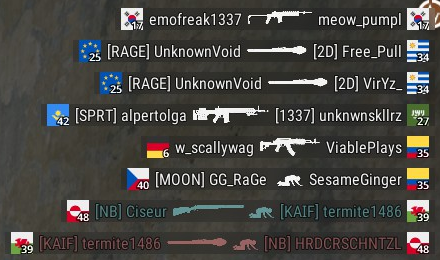
killfeed-preview.png (0.2 MB)
Observer.zip
44.3 KB • Ready to use in game directory
akerman88
REDAKCJA PUBG POLSKA
Author of tactical guides and PUBG knowledge base articles.
Source:
PUBG Polska Portal
• 05.05.2024
Was this guide helpful?
Leave a like to help other PUBG players find top tips!
Zauważyłeś błąd w tym poradniku?
Literówka, błędna punktacja lub nieścisłość? Prześlij zgłoszenie bezpośrednio do redakcji.
KOMENTARZE (0)
Wpisz swój nick z PUBG (Steam) oraz nick z Discorda na serwerze PUBG Polska, aby dodać komentarz.